The design of your forms is more than just an aesthetic choice—it plays a key role in how effectively your audience engages with them. A well-designed form can make the difference between a high conversion rate and a missed opportunity. With Clickiny, you have the tools to customize the appearance of your forms to suit your brand and appeal to your audience.
Why Good Form Design Matters
Forms are often the first interaction potential customers have with your business, whether they’re submitting a booking request, filling out a contact form, or responding to a survey. A clean, professional design:
- Instills trust and credibility.
- Encourages users to complete and submit the form.
- Enhances user experience by making the form visually appealing and easy to navigate.
Clickiny offers two distinct form design types, ensuring you can tailor your forms to fit your brand identity and audience preferences.
Form Types: Classic vs. Modern
Classic Forms
Classic forms feature a traditional, structured design with defined corners and box-like shapes. This style is ideal for businesses that prefer a formal, organized look. It’s perfect for industries like law firms, financial services, or traditional corporate settings where structure and professionalism are key.
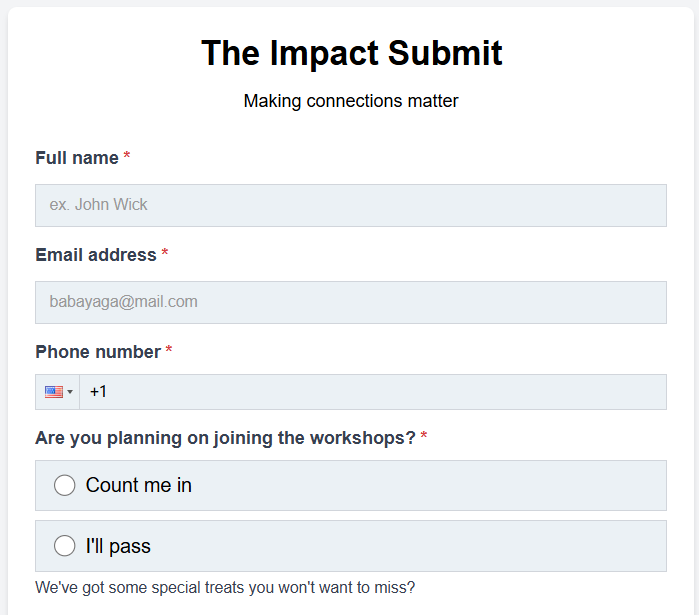
Key features of classic forms:
- Boxed corners for a structured layout.
- A timeless, familiar design that resonates with most users.
- Best suited for businesses emphasizing clarity and professionalism.
Modern Forms
Modern forms embrace a sleek, flat design with soft edges and minimalistic aesthetics. This style is perfect for businesses looking to present a contemporary, creative, or tech-savvy image. Whether you’re running a startup, an e-commerce store, or a digital agency, modern forms offer a clean and cutting-edge design.
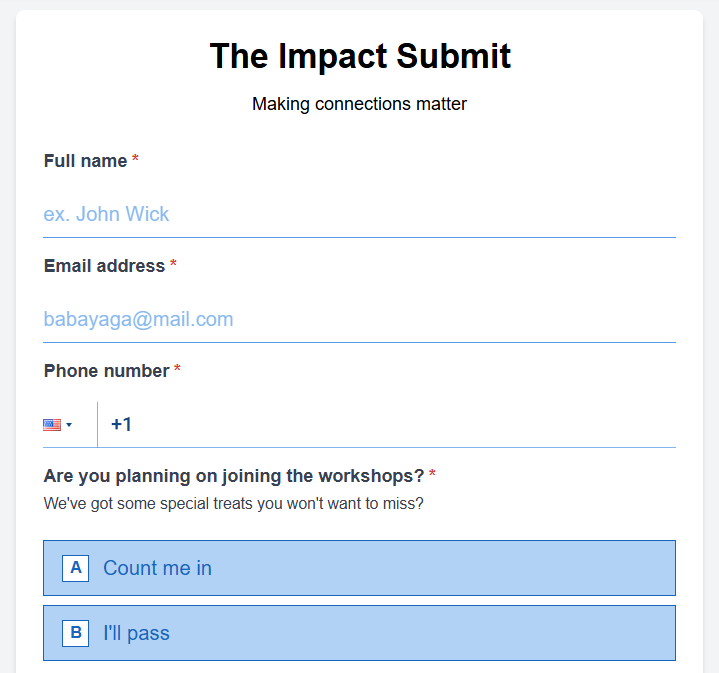
Key features of modern forms:
- Flat, borderless design for a seamless, modern look.
- Emphasizes simplicity and functionality.
- Perfect for brands aiming to appear innovative and trendy.
How to Choose and Customize Your Form Design
You can easily customize your form design in Clickiny. Here’s how:
- Open the Form Builder in your dashboard.
- Click the Appearance tab.
- A panel will open on the right-hand side.
- Under the GENERAL tab, you’ll find the Form Type option.Choose between Classic or Modern, and preview the changes in real time.
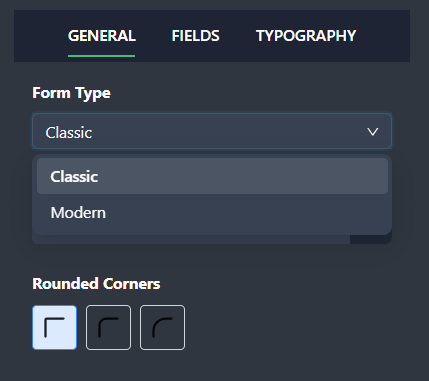
Once you’ve selected your form type, you can further personalize its colors, fonts, and style elements to ensure it fits seamlessly with your brand.
Designing with Purpose
When deciding between classic and modern forms, consider the tone and personality of your brand. Ask yourself:
- Who is your target audience?
- What impression do you want to leave?
- Does your design align with your website or brand aesthetics?
By thoughtfully designing your forms, you create a positive user experience that enhances your brand and boosts conversions. Take the time to experiment with form styles and create something that works for both your business and your audience.